New EHS Health Card Download- ABHA ID Update :: Telangana Employee/Pensioner Health Card Download
How to Download NEHS Health Card : New Employees Health Card ఎలా Download చేసుకోవాలి? New Employees Health Card Download – Health Card పొందే విధానం & Complete Details – NEHS లో ABHA ID ఎలా Update / Link చేయాలి?
NEW EMPLOYEES HEALTH SCHEME EMPLOYEE/PENSIONER LOGIN HEALTH CARD-New Employees Health Scheme (NEHS) కింద అర్హత కలిగిన ఉద్యోగులు, పెన్షనర్లు మరియు ఇతర beneficiaries తమ Digital Health Card ను Download చేసుకొనే విధానం, NEHS లో ABHA ID ఎలా Update / Link చేయాలి? పూర్తి వివరాలు.
తెలంగాణ ప్రభుత్వ ఉద్యోగులు, పెన్షనర్లు మరియు ఇతర లబ్ధిదారుల కోసం ప్రవేశపెట్టిన New Employees Health Scheme (NEHS) కింద అర్హత కలిగిన ప్రతి ఒక్కరూ తమ Digital Health Card ను ఆన్లైన్లో సులభంగా డౌన్లోడ్ చేసుకోవచ్చు. వైద్య చికిత్సల సమయంలో ఎలాంటి ఇబ్బందులు తలెత్తకుండా ఉండటానికి ఈ డిజిటల్ హెల్త్ కార్డ్ ముఖ్యం. మీ ఎంప్లాయ్ ఐడీ (Employee ID) లేదా Pensioner ID వివరాలను ఉపయోగించి అధికారిక పోర్టల్ ద్వారా మీ హెల్త్ కార్డును ఎలా పొందాలి, డౌన్లోడ్ చేసుకునే విధానం మరియు తదితర పూర్తి వివరాలను క్రింది స్టెప్స్ ద్వారా తెలుసుకోండి.
IMPORTANT NOTICE – HEALTH CARDS & ABHA ID
All employees are informed that all Health Cards have been updated.
- Please check and verify your details carefully.
- Generate the ABHA ID number for each family member using Aadhaar OTP verification.
- After generating the ABHA ID, download the Health Card.
- Health Card Download / Employee Login
- Please ensure that the details and ABHA ID numbers of all family members are correct before downloading the cards.
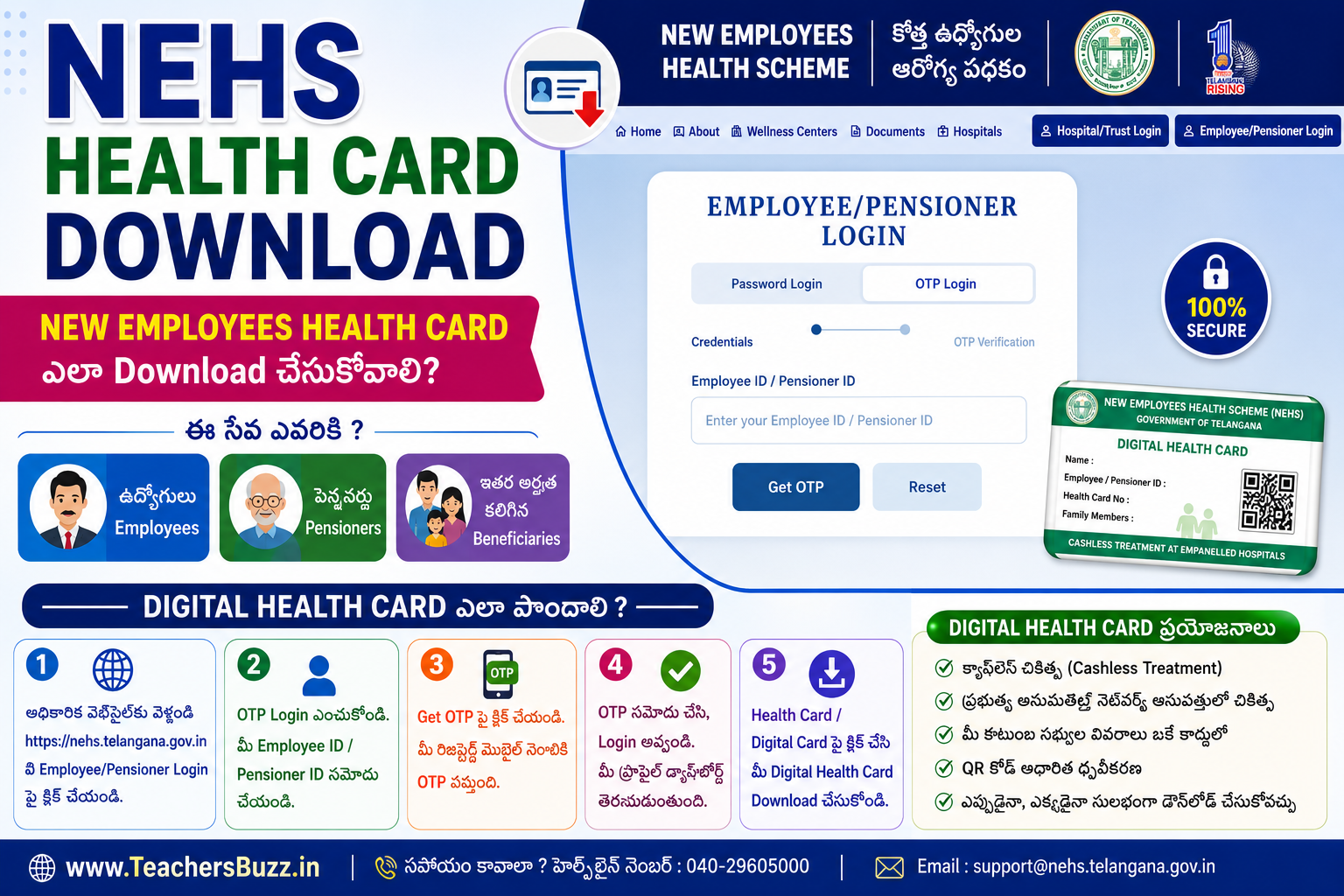
NEW EMPLOYEES HEALTH CARD (హెల్త్ కార్డ్) డౌన్లోడ్ చేసుకునే విధానం (Step-by-Step Process):
-
అధికారిక వెబ్సైట్ను సందర్శించండి: ముందుగా తెలంగాణ ప్రభుత్వానికి సంబంధించిన అధికారిక హెల్త్ కార్డ్స్ పోర్టల్ NEHS Official page ఓపెన్ చేయండి
-
Login ఆప్షన్ను ఎంచుకోండి: వెబ్సైట్ హోమ్పేజీలో “Employee/Pensioner Login అనే ఆప్షన్ కనిపిస్తుంది, దానిపై క్లిక్ చేయండి.
- ఇలా పేజీ కనబడుతుంది
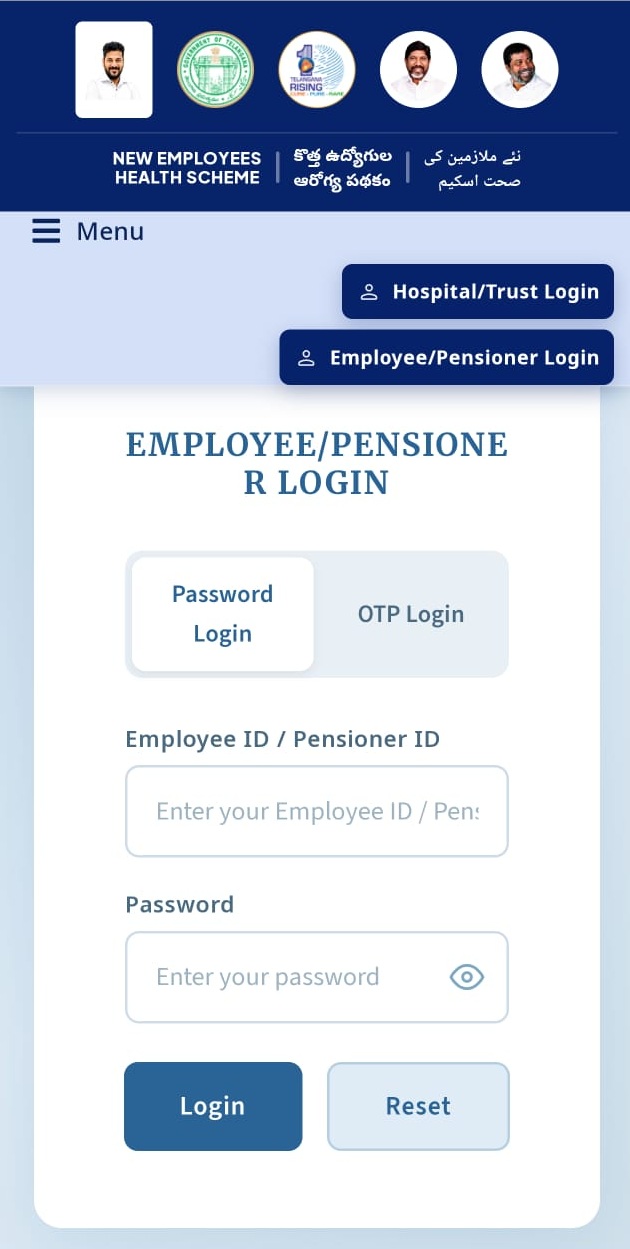
2. OTP Login పైన క్లిక్ చేయండి.
3. మీ యొక్క Employee ID / Pensioner ID ఎంటర్ చేసి Get OTP పైన క్లిక్ చేయండి.
4. మీ Mobile Number కు వచ్చిన OTP ఎంటర్ చేసి Verify & Login పైన క్లిక్ చేయండి.
5. ఇపుడు మీ వివరాలతో ఒక డాష్ బోర్డు ఓపెన్ అవుతుంది. ఇందులో హెల్త్ కార్డ్ వివరాలు స్క్రీన్ పై కనిపిస్తాయి.
6. అదే విధముగా Beneficiaries & Dependents వివరాలు కనబడుతాయి.
7. ఇక్కడ View Card పైన క్లిక్ చేయగానే మీ Health Card display అవుతుంది.
8. అక్కడ మీకు Download Health Card లేదా Print అనే ఆప్షన్ లభిస్తుంది.
9. ఇందులో Download Card పైన క్లిక్ చేయగానే మీ Health Card Download అవుతుంది.
10. Print అనే ఆప్షన్ క్లిక్ చేసి మీ హెల్త్ కార్డ్ PDF ఫార్మాట్లో డౌన్లోడ్ చేసుకోవచ్చు.
Click Here to Download New EHS HEALTH CARD
NEHSలో ABHA ID ఎలా Update / Link చేయాలి?
NEHSలో ABHA Number Create / Link చేయడానికి క్రింది విధంగా process ఉంటుంది.
Step 1: NEHS Portalలో Login చేయండి
NEHS Employee/Pensioner Loginలో మీ Employee ID / Pensioner IDతో login అవ్వండి.
Step 2: ABHA Option ఎంచుకోండి
Login అయిన తర్వాత ABHA / ABHA Number Creation & Linkingకు సంబంధించిన optionను select చేయండి.
Step 3: ABHA Consent Form
మీకు “ABHA Consent Form – Beneficiary ABHA Number Creation & Linking Consent” అనే screen కనిపిస్తుంది.
ఈ formలో మీ Beneficiary Details మరియు Health Card No. కనిపిస్తాయి.
Step 4: Consent ఇవ్వాలి
Screenshotలో చూపిన విధంగా 6 Consent Items ఉంటాయి. అందులో ముఖ్యమైనవి:
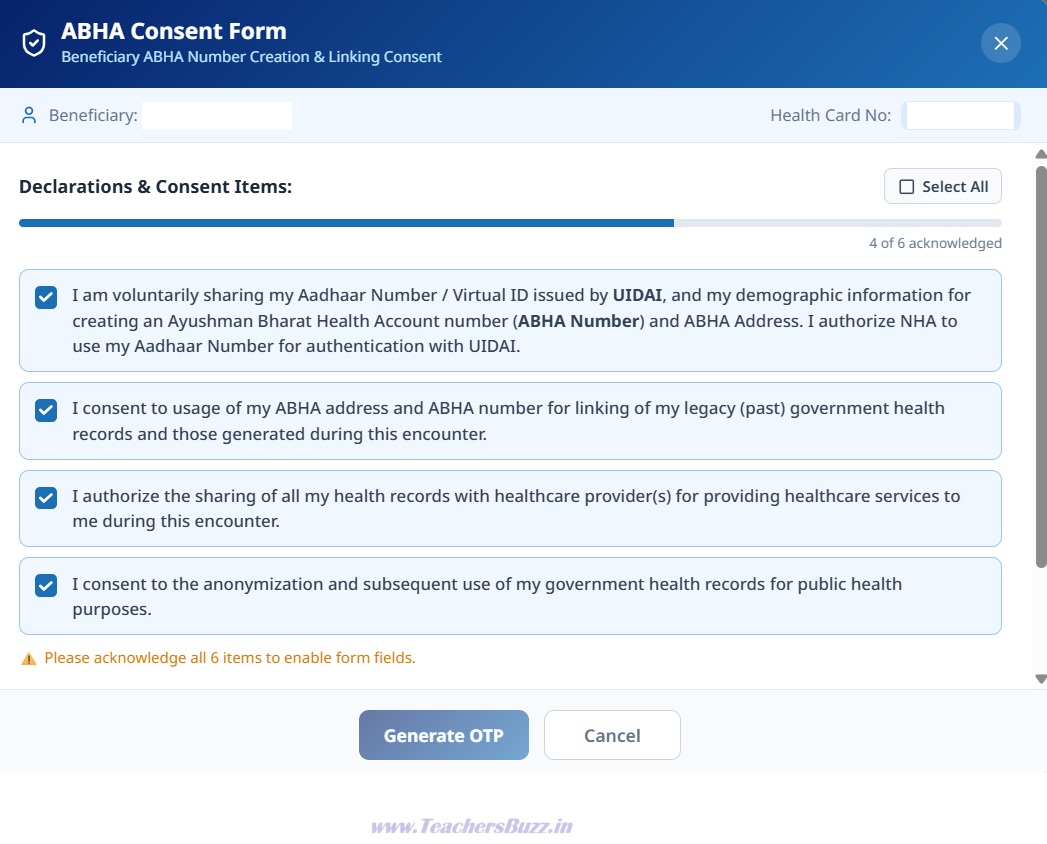
- Aadhaar Number / Virtual ID మరియు demographic informationను ఉపయోగించి ABHA Number & ABHA Address create చేయడానికి consent.
- మీ ABHA Number / ABHA Addressను గతంలోని Government Health Records మరియు ప్రస్తుత health recordsతో link చేయడానికి consent.
- Healthcare services అందించడానికి అవసరమైనప్పుడు Health Recordsను Healthcare Providersతో share చేయడానికి authorization.
- Government health recordsను anonymization చేసి Public Health purposes కోసం ఉపయోగించడానికి consent.
అవసరమైన అన్ని Checkboxesను select చేయండి.
Step 5: Aadhaar Number
Aadhaar Number* fieldలో మీ Aadhaar Numberను enter చేయండి.
Step 6: Authentication Type
Authentication Type*ను select చేయండి.
Step 7: Generate OTP
అన్ని details పూర్తి చేసిన తర్వాత Generate OTP buttonపై click చేయండి.
Aadhaar-linked mobile numberకు వచ్చిన OTPను enter చేసి authentication పూర్తి చేయండి.
Step 8: ABHA Linking
Authentication successful అయిన తర్వాత మీ ABHA Number / ABHA Addressను beneficiary యొక్క NEHS Health Recordsతో Create / Link చేసే process complete అవుతుంది.
New Health Cards Employees/ Pensioners Login Official Portal
https://nehs.telangana.gov.in/employeelogin
TELANGANA NEW EHS – District-wise Network & Corporate Hospitals List (జిల్లాల వారీగా ఉన్న నెట్వర్క్ మరియు కార్పొరేట్ ఆసుపత్రుల జాబితా కోసం ఇక్కడ క్లిక్ చేయండి)
Telangana New Employees Health Scheme (New EHS) Guidelines 2026 (కొత్త ఈహెచ్ఎస్ మార్గదర్శకాలు మరియు పూర్తి వివరాల కోసం ఇక్కడ క్లిక్ చేయండి)
ప్రధానమైన సూచనలు:
How to update/link ABHA ID in NEHS
- Open the official NEHS Employee/Pensioner Login. The current NEHS portal provides both Password Login and OTP Login for employees/pensioners.
- Login using your Employee ID / Pensioner ID.
- Open the beneficiary/health-card section and select the option related to ABHA / ABHA Number Creation & Linking.
- The screen shown in your image will appear as “ABHA Consent Form – Beneficiary ABHA Number Creation & Linking Consent.”
- Read and acknowledge the consent items. Your screenshot shows 6 acknowledgement items in total, with the visible declarations including:
- Consent to share Aadhaar Number / Virtual ID and demographic information with UIDAI for creating an ABHA Number and ABHA Address.
- Consent to use the ABHA Number/Address for linking legacy (past) government health records and records generated during the current encounter.
- Authorization to share health records with healthcare providers for providing healthcare services.
Consent for anonymization and subsequent use of government health records for public-health purposes. - After selecting the required consent checkboxes, enter your Aadhaar Number.
- Select the Authentication Type.
- Click Generate OTP.
- Enter the OTP received on the Aadhaar-linked mobile number and complete authentication.
- After successful authentication, your ABHA Number/ABHA Address can be created or linked with the beneficiary’s NEHS health records, subject to the portal’s verification process.
New Health Cards Employees/ Pensioners Login Official Portal
- కొత్త ఉద్యోగుల వివరాలు NEHS పోర్టల్లో ఇంకా అప్డేట్ కాకపోతే లేదా Health Card జనరేట్ కాకపోతే, ముందుగా మీ సంబంధిత DDO (Drawing and Disbursing Officer) ను సంప్రదించండి.
- ఉద్యోగి వివరాలు, Employee ID మరియు ఇతర అవసరమైన సమాచారం సరిగ్గా అప్డేట్ అయ్యేలా సంబంధిత అధికారుల ద్వారా చర్యలు తీసుకోవాలి.
- Health Card డౌన్లోడ్ చేసిన తర్వాత, కార్డులో ఉన్న పేరు, Employee/Pensioner ID, ఫొటో మరియు కుటుంబ సభ్యుల వివరాలు సరిగ్గా ఉన్నాయో లేదో తప్పనిసరిగా పరిశీలించండి.
- కార్డులో ఏవైనా తప్పులు లేదా వివరాల్లో మార్పులు అవసరమైతే, సంబంధిత DDO/అధికారులను సంప్రదించి వివరాలను సరిచేయించుకోవాలి. మార్పులు పూర్తయిన తర్వాత అవసరమైతే Health Cardను మళ్లీ డౌన్లోడ్ చేసుకోవచ్చు.
- NEHS Health Card పొందడానికి అధికారిక పోర్టల్నే ఉపయోగించండి: NEHS Employee/Pensioner Login
Telangana New EHS Guidelines 2026:: New Employees Health Scheme for Employees and Pensioners Complete Details
New EHS Scheme Telangana- District Wise Network Hospitals List Download
About The Author
